Subtitle Acquisition
Before legendarr can translate a subtitle it doesn't already have, it needs somewhere to get one from. This page covers the first step: registering which subtitle-provider sites legendarr is allowed to use, and confirming their credentials work.
Provider registration
Settings → Subtitle Providers lists a fixed catalog of thirteen general-purpose subtitle sources — OpenSubtitles, Addic7ed, YIFY Subtitles, Subdl, TVsubtitles, legendas.net, Napiprojekt, Subsource, Anime Tosho, Supersubtitles, AnimeKalesi, GreekSubtitles, and BetaSeries. Each one can be enabled or disabled, and configured with the credential it needs (an API key, a username/password pair, or none at all, depending on the provider).
"Test connection" runs a lightweight check per provider — for five of the six with a real API key or login (Subdl, legendas.net, Addic7ed, BetaSeries, and OpenSubtitles — a username/password login against the user's own account, not an API key), it validates the credential against the provider's own service; for a provider with no credential (YIFY Subtitles, TVsubtitles, Napiprojekt, Anime Tosho, Supersubtitles, AnimeKalesi, GreekSubtitles), it only confirms the site is reachable. Subsource is the exception: it needs an API key like the others, but its API docs are Cloudflare-protected, so its "test connection" is reachability-only too — the key itself isn't validated yet.
OpenSubtitles also has three extra search options: hash-based matching (use_hash), and whether to include AI-translated or machine-translated results — see below, this is the feature that reads them.
Search and download
Every one of the thirteen catalog kinds now has a real SubtitleProvider implementation (subtitle_acquisition/providers/opensubtitles.py, addic7ed.py, yify_subtitles.py, subdl.py, tvsubtitles.py, legendas_net.py, napiprojekt.py, subsource.py, animetosho.py, supersubtitles.py, animekalesi.py, greeksubtitles.py, betaseries.py) — 0.6.0 is fully shipped. YIFY Subtitles and Subdl are both movies-only and need an imdb_id to search (neither has a usable title-search path for this app's scope), so — like Addic7ed's series case — a series search returns no results from either. TVsubtitles, AnimeKalesi, Anime Tosho, and BetaSeries are the opposite: none has movie content, so each is skipped for a movie or an unresolved episode and instead needs a real season/episode number to search — Anime Tosho and BetaSeries additionally require Series.tvdb_id to resolve their own per-episode id (an AniDB episode id and a BetaSeries episode id, respectively), while AnimeKalesi (Turkish only) resolves the episode from its own scraped season/episode listing instead. Anime Tosho's AniDB episode id resolution only runs when its optional API Key (a free AniDB HTTP API client name) is set; without one, it instead lists every release for the anime and matches the target episode against each file's own name — less precise, but no credential needed at all. legendas.net, Subsource, and Supersubtitles all have real movie and TV content, searching by imdb_id for a movie and by season/episode for a series (neither means the search is skipped, same shape as LegendasNetProvider); legendas.net is Brazilian Portuguese only, Supersubtitles is Hungarian/English only. GreekSubtitles also has both movie and TV content, but with a single search path (a season/episode suffix is just appended to the title query when both are resolved) — Greek/English only, and only its first results page is fetched (no "Next"-page pagination). Napiprojekt is different again: instead of a title search it hashes the local video's own first 10MB (subtitle_acquisition/napiprojekt_hash.py) and asks for an exact match — Polish only, and it applies equally to a movie or a series file since nothing but the hash is used. acquire_subtitle_for_media_file (subtitle_acquisition/acquire_media_file_subtitle.py) is the entry point: given a MediaFile that has no subtitle yet in any of its LanguageProfile's source languages, it searches each source language in priority order, downloads the best-scoring result, writes it next to the video ({video}.{language}.srt), and re-scans so it shows up as a normal external subtitle. It's callable ad-hoc via subtitle_acquisition/jobs.py (enqueue_acquisition/enqueue_full_acquisition_scan, same shape as subtitle_translation/jobs.py), and also runs on its own periodic schedule (register_acquisition_job, 0.10.0). translate_media_file itself still doesn't call it directly on a missing source subtitle — but the translation job now does: when translate_media_file reports no_source_subtitle, subtitle_translation/jobs.py's run_translation cascades into an acquisition run and retries translation once it finds something, so the periodic/on-demand translation path gets the same external-file → embedded-track → provider-download ordering the webhook/import path already had (ROADMAP.md 0.12.0).
Search precision differs by media type:
- Movies search OpenSubtitles by
imdb_id— a precise, single-title lookup. - Series also get a real season/episode number now — resolved via
media_library.locate.resolve_media_file_episode(a live Sonarr call, matched byrelative_pathagainst theMediaFile),Nonewhen it can't be resolved. TVsubtitles, legendas.net, Subsource, Supersubtitles, AnimeKalesi, GreekSubtitles, Anime Tosho, and BetaSeries all anchor their series search on it; the remaining providers still ignore it and search by title only, so title-only results from those can include subtitles for other episodes of the same show, and the match-score cutoff below is what keeps a clearly-wrong one from being accepted for them, not a substitute for real per-episode search. - Either kind additionally gets
moviehashsearch whenuse_hashis enabled on the provider and the local video is at least 64KB — the OpenSubtitles-defined checksum of a file's first and last 64KB, the most precise signal available since it doesn't depend on any metadata at all (subtitle_acquisition/opensubtitles_hash.py). - The local video's path is also passed to every provider's
search()asvideo_path— every provider but Napiprojekt ignores it. Napiprojekt's result sets itsrelease_nameto the video's own filename, so the match-score cutoff below trivially accepts it: an exact hash match is definitionally the right subtitle for that file, and the API returns no other metadata to score against.
Before scoring, every candidate is checked against the profile's must_contain/ must_not_contain release-name filters (subtitle_acquisition/release_filters.py): must_contain rejects a candidate unless its release name contains at least one of the listed terms, must_not_contain rejects it if it contains any of them — same OR/OR semantics as a Radarr/Sonarr Release Profile's term lists, both configured per LanguageProfile. Whatever's left is only accepted once it clears a match-score cutoff (subtitle_acquisition/match_score.py): a SequenceMatcher title-similarity ratio between the candidate's release name and the local video's filename (both with any recognized resolution/source/codec/release-group/edition tokens stripped out first, via subtitle_acquisition/release_attributes.py), plus a weighted bonus for each of those five attributes the candidate shares with the reference filename — only counted when the reference filename actually has a detectable value for that attribute. Title similarity is weighted well above the combined attribute bonus specifically so a wrong-title candidate can never out-score a right-title one purely by sharing resolution/source/codec tags; attributes only fine-tune the ranking once the title itself is a real match.
Speech-to-text fallback
When every other tier — external file, embedded track, provider download — comes up empty for every one of a profile's source languages, and the profile's speech_to_text_fallback toggle (ROADMAP.md 0.15.0) is on, acquire_subtitle_for_media_file tries one more thing: transcribing the media file's own audio with a local Whisper model (faster_whisper) instead of giving up. This is a last resort, tried once per acquisition run, not a SubtitleProvider — it has no external catalog or credentials, and runs the same "local pipeline producing an .srt" shape as the OCR pipeline below.
probe_embedded_audio.py lists the container's embedded audio tracks via ffprobe, and picks the first one whose language tag matches one of the profile's source languages, in priority order (comparison is the same loose, region-collapsing language_codes.normalize_language_code() used for embedded subtitle tracks). When nothing tags-matches — container audio-language metadata is frequently missing or wrong — it falls back to the first audio track, transcribed as the profile's first source language: the best guess available without a real tag to go on. The chosen track is extracted to a temporary 16kHz mono .wav (extract_audio_track), fed to transcribe_audio.transcribe_audio_track, forcing Whisper's recognition to the resolved language rather than letting it auto-detect, and the result is written out as a normal {video}.{language}.srt sidecar and re-scanned — indistinguishable on disk from a provider-acquired or external subtitle.
Unlike a provider download, a speech-to-text acquisition never writes an AcquiredSubtitle/AcquisitionAttempt row: those tables record a release's provenance (name, download id, match score), none of which exists for a locally generated transcript. The Whisper model itself (faster_whisper, CPU) is downloaded on first use into data_dir/whisper_models and reused after that — no model is bundled into the Docker image, since sizes range from tens of MB (tiny) to a few GB (large-v3). Settings.speech_to_text_model_size (default base) and Settings.speech_to_text_timeout_seconds (default 1800s — far higher than any other timeout in the app, since transcribing a full movie on CPU can take a while) are config.yaml/env-var-only for now, same posture as translate_interval_minutes and ocr_cue_timeout_seconds.
Manual search and upload
Every movie/series detail page's file row also has "Manual search" and "Upload subtitle" buttons — a user-driven alternative to acquire_subtitle_for_media_file above, for when the automatic match isn't trusted or a provider hasn't found anything. Both bypass the automatic path entirely: neither is gated on a LanguageProfile, and the language searched for or uploaded is a free choice (any of legendarr_web/languages.py's SUPPORTED_LANGUAGES), not restricted to the item's configured source languages — a user might already have (or find) a correct target-language subtitle and want to skip translation altogether.
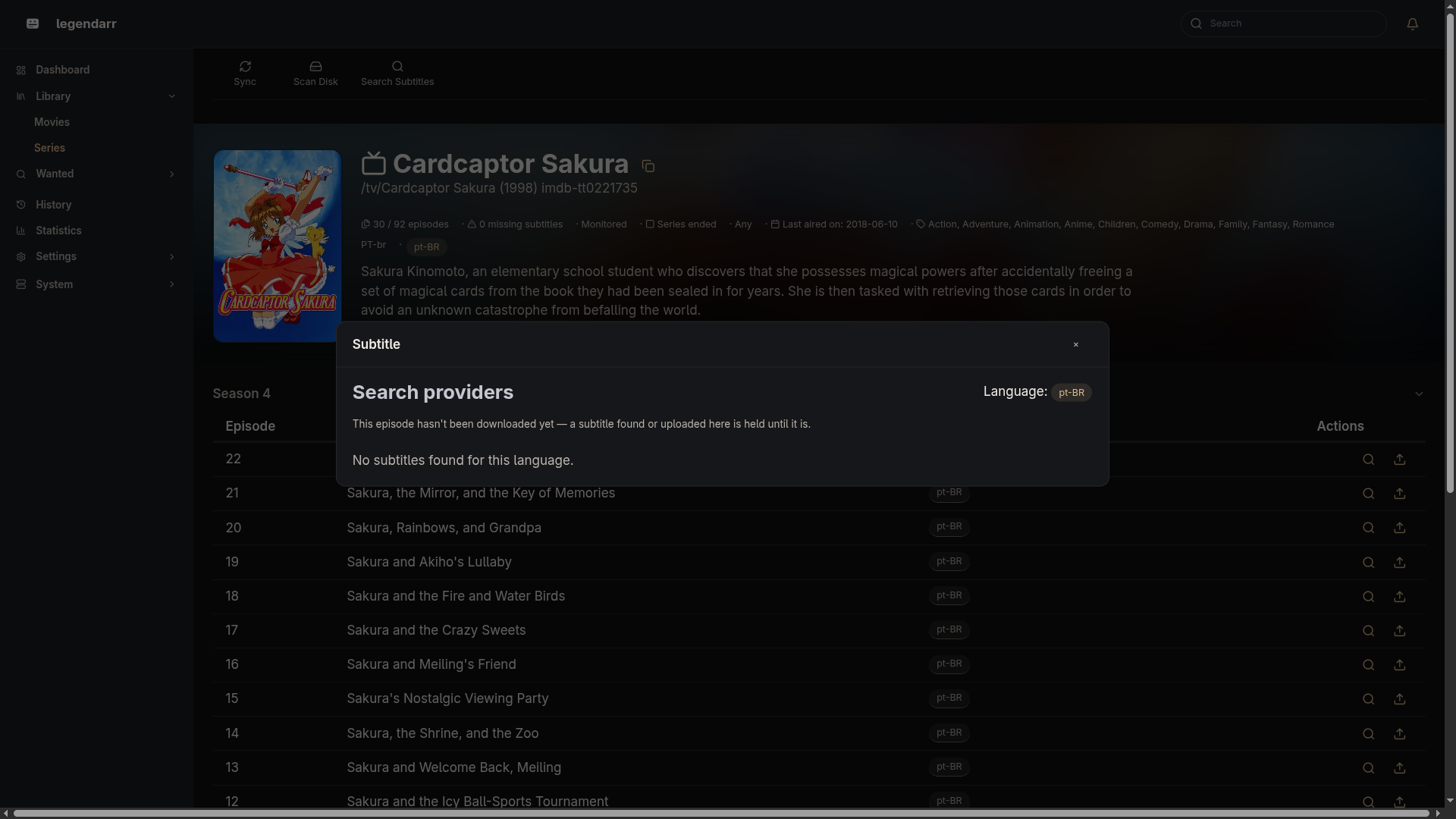
"Manual search" (GET /media/files/{id}/subtitle-candidates, backed by subtitle_acquisition/search_media_file_subtitle.py) searches every provider in the resolved chain for the chosen language — unlike the automatic path, it never stops at the first above-cutoff match; it collects every candidate from every provider, tags each with the provider's name and match_score.py's score_candidate(), and returns them sorted best-first so the user can compare and pick. Downloading a chosen candidate (POST /media/files/{id}/subtitle-candidates/download, subtitle_acquisition/download_media_file_subtitle.py) re-resolves the provider by name, downloads it, writes it next to the video, and re-scans — same {video}.{language}.srt convention as the automatic path, and same tolerance for a provider error (returns a (False, message) result instead of raising, mirroring "Test connection"). The request carries the language twice on purpose: language is what the provider reported (kept so providers that locate the download by language still can) and target_language is the language the search ran in, which is what the sidecar is named after — the two can differ when a provider formats a region subtag differently (e.g. pt vs pt-BR).
"Upload subtitle" (POST /media/files/{id}/subtitle-upload, subtitle_acquisition/upload_media_file_subtitle.py) accepts a user-supplied file directly, skipping providers altogether. It's written next to the video as {video}.{language}.{ext}, ext being whichever of .srt/.ass/.ssa/.vtt was uploaded — the same four extensions subtitle_discovery's external scan already recognizes as a sidecar. A manually uploaded .ass/.ssa/.vtt inherits an existing, pre-existing gap: translate_media_file only knows how to parse .srt, so it won't translate correctly from a non-.srt source yet — true of any hand-placed non-.srt external subtitle today, not something this feature introduces.
Both actions re-scan on success, so the result shows up immediately in the file row's subtitle badges without a page reload.