Subtitle Translation
Translation backends implement a single TranslationProvider protocol:
class TranslationProvider(Protocol):
    name: str

    def translate_batch(
        self, texts: list[str], source_language: str, target_language: str
    ) -> list[str]: ...
Every subtitle is translated in one call — every line goes out together and comes back in the same order — instead of one request per line. This keeps the translation step decoupled from whichever service does the actual work.
Built-in providers
| Provider | Description |
|---|---|
echo | Returns the input unchanged. Used for local development and tests. |
deepl | DeepL — needs an API Key. Free-tier (:fx-suffixed) keys are routed to the free-tier host automatically. |
google | Google Cloud Translation (v2) — needs an API Key. |
libretranslate | LibreTranslate — self-hosted, needs an Endpoint URL; an API Key is only required by instances that opt into one. |
llm | Any OpenAI-compatible /chat/completions API — OpenAI itself, or a self-hosted/third-party endpoint that speaks the same protocol (Ollama, LM Studio, OpenRouter, Groq, ...). Needs an API Key; Endpoint and Model both default (to https://api.openai.com/v1 and gpt-4o-mini) when left blank. |
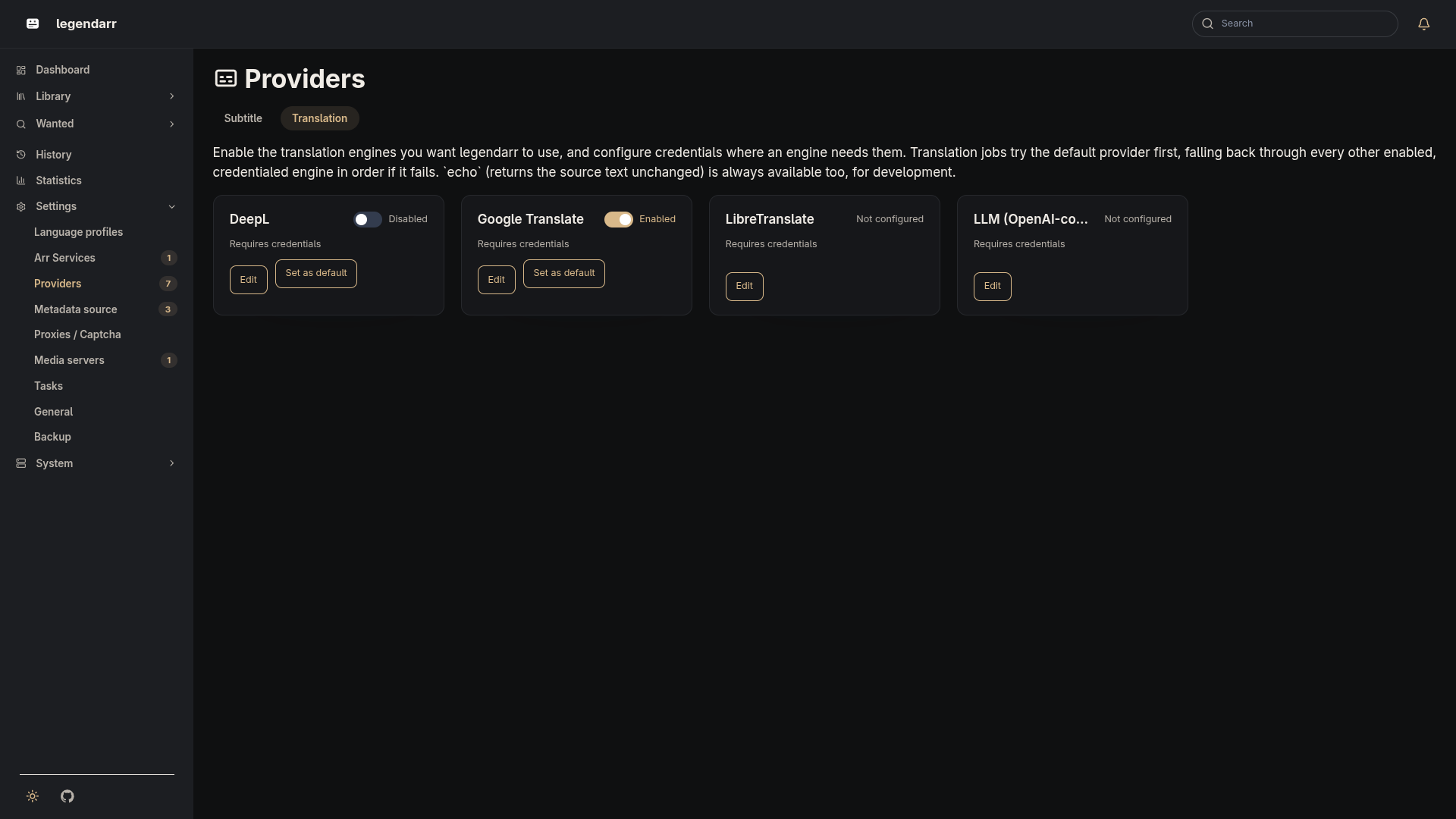
deepl, google, libretranslate, and llm are registered and credentialed from /settings/translation-providers/: enable the ones you want, fill in whichever credential fields they need, and use "Test connection" to confirm they're reachable before relying on them. echo needs no credentials and is always available, for development.
Provider selection
Provider selection is a global setting, not a per-language profile field — a LanguageProfile only says which languages to translate into, not which engine to use. From /settings/translation-providers/, one enabled and credentialed provider can be marked the default. A translation job tries the default first, then falls through every other enabled, credentialed provider in id order if the default fails or isn't set — so a job never fails outright just because one engine is briefly unavailable, as long as another is configured.
Custom prompt for the llm provider
The llm provider's edit form has a Prompt Template field — leave it blank to use the built-in prompt, or supply your own to tune tone, terminology, or instructions for a specific model. A custom template must use the same three placeholders the built-in prompt does:
| Placeholder | Meaning |
|---|---|
{source} | Source language code (e.g. en) |
{target} | Target language code (e.g. pt-BR) |
{count} | Number of subtitle lines in the batch |
A literal { or } in the prompt text itself needs to be doubled ({{/}}) so it isn't read as a placeholder. The template is validated when you save it — an unknown placeholder is rejected with an error instead of silently breaking the next translation run. Only the system prompt is customizable; the request payload shape and the expected {"translations": [...]} response format are fixed.
Plugins (third-party providers)
A translation engine legendarr doesn't ship built in can be added as a plugin, without recompiling or redeploying legendarr itself. A plugin is a Python class implementing the TranslationProvider protocol above, plus a bit of catalog metadata:
class MyTranslationProvider:
    kind = "my-provider"                      # must not collide with a built-in kind
    label = "My Provider"                      # display name in the web UI
    name = "my-provider"                        # TranslationProvider.name
    credential_fields = ("api_key", "endpoint")  # subset of: api_key, endpoint, model, prompt_template
    required_credential_fields = ("api_key",)    # subset of credential_fields required for "has credentials"
    plugin_api_version = 1                       # checked against legendarr's supported version

    def __init__(self, config: TranslationProviderConfig) -> None: ...
    def translate_batch(self, texts, source_language, target_language) -> list[str]: ...

    # Optional — backs the "Test connection" button. A plugin without one gets a
    # generic "configuration saved" result instead.
    @staticmethod
    def test_connection(config: TranslationProviderConfig) -> tuple[bool, str]: ...
A plugin can only use the four existing config fields above (api_key, endpoint, model, prompt_template) — there's no free-form/arbitrary config, so a plugin never needs its own database migration.
Point legendarr at the plugin with LEGENDARR_TRANSLATION_PLUGIN_PACKAGES — a comma-separated list of module.path:ClassName entries, e.g.:
The plugin's package needs to already be installed in the container (build a custom image FROM the legendarr image with an extra pip install layer, or mount it onto PYTHONPATH) — legendarr only imports what's already reachable, it doesn't fetch packages at runtime.
Plugin loading never blocks startup: an entry that's malformed, unimportable, missing required metadata, declares an incompatible plugin_api_version, or whose kind collides with a built-in provider or another plugin is skipped and logged, and every other provider (built-in or plugin) still loads normally. The plugin list is read once at process startup — adding or removing an entry needs a container restart, and it isn't editable from the web UI, since it's a code-import path rather than an ordinary runtime setting.